
Custom Wizard Plugins and Addons for ACT!
 |
Click here for information on our recently acquired Automation Products - Sales Automation Manager, Mail Merge and Web Prospect |
Our programming staff has put together software for ACT! that compliment the ACT! program. These ACT! Addons handle mass creation of company records, advanced copy and replace features, mass duplicate contact removal, primary to secondary contact movement, ACT to Outlook Copy, and an Excel table showing all the fields in an ACT database. Check back often as we create and add new ACT Addons.
Testimonial: “If all software publishers were so cooperative, computer sales would probably triple! “ Michael Hamilton
|
Duplicate Contact Expert Wizard - $149.99
ACT! allows you to merge and remove duplicate contacts, but only two at a time. Our products allows you to do this in mass. It is a stand alone program that runs outside of ACT!
|
[wp_cart_button name="Duplicate Remover Wizard Expert" price="149.99" item_number="idPECDRE1-10"]Version for ACT 2010 (10.0.2) to 2012
[wp_cart_button name="Duplicate Remover Wizard Expert - 2013" price="149.99" item_number="idPECDRE31-10"]Version for ACT 2013 and higher
System Requirements - ACT! There are two SKU's for this product - one is for version 2013 and higher and one is for versions from 10.0.2 to 2012. 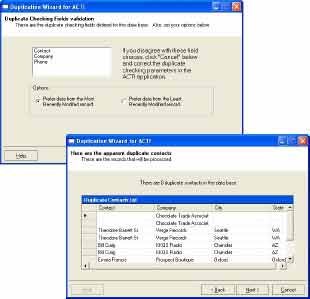
$149.99
[always_show_wp_shopping_cart]
If you create a contact, you can tell ACT! to create a company record from that contact. This ACT! add-on creates a way to link multiple contacts and create companies all at once rather than one at a time. For example, you import large amounts of data into an ACT! database. Now, you want to do a mass update and build company records based on the data imported. You also want to make sure you create the contact links at the same time. The Company Wizard Plus tool is the answer. When in a contact list view, you locate the Company Wizard Plus on the Tools menu. You select the contacts you wish to work with.
This ACT! addon wizard will do the following:
- Create Companies and Link Contacts function
- Link a contact to an existing company record.
- Create a company record if it does not exist and then link the contact.
- Bypass contacts with blank company or contact names.
- Multiple field match (up to 3 fields) to link, and none of these fields is required to be the Company Name
- Turn contacts into Static Members of Company but not Linked
- Provide a summary box showing how many company records were created, how many contacts were linked and how many were skipped.
- Unlink Contacts function
- Mass unlink selected contacts from the Contact List.
- Update Linked Contacts function
- Update linked fields on linked Contacts for the Companies displayed in the current Company list. This is a mass push of the field contents from the Company record to the Contact record. There is an option to only fill blank fields in the Contact record from the linked field in the Company record although this is not the default or recommended action for this function
- Update Linked Companies function
- Update linked fields on linked Companies for the Contacts displayed in the current Contact list. This is a mass push of the field contents from the Contact record to the Company record. There is an option to only fill blank fields in the Company record from the linked field in the Contact record, and this is the default and recommended action for this function.
- Flatten Company Hierarchy function
- This function takes all the divisions and sub-divisions of the displayed Company Detail record and rearranges them so that result is that all divisions and sub-divisions are now immediate children of the parent company. The result is a two-level Parent Company with Divisions structure.
- Delete Selected Companies function
- This function deletes the selected (highlighted) companies from the Company list. This allows multiple companies to be deleted in one operation. Although this function is built in to Act! v16 this brings this function to earlier versions of Act!.
When a Company Record is created by Company Wizard Plus, the following fields are copied from the Contact record to the new Company Record:
- The default ACT! fields that get copied by Contact/Create Company from Contact
- The additional fields Phone, Extension, Fax Phone, Fax Extension, and ID/Status
- Any fields defined as Linked fields between Contact and Company in Define Fields
- The fields selected in Company Wizard as the search/match fields
Click here for more details and an online manual
System Requirements: ACT! 2009 and higher
Price: $79.99 [wp_cart_button name="Company Wizard Plus" price="79.99" item_number="idPECCP1-10"]System Requirements- ACT 2009 and higher
 $79.99
Company Wizard - $49.99
If you create a contact, you can tell ACT! to create a company record from that contact. This ACT! add-on creates a way to link multiple contacts and create companies all at once rather than one at a time. For example, you import large amounts of data into an ACT! database. Now, you want to do a mass update and build company records based on the data imported. You also want to make sure you create the contact links at the same time.
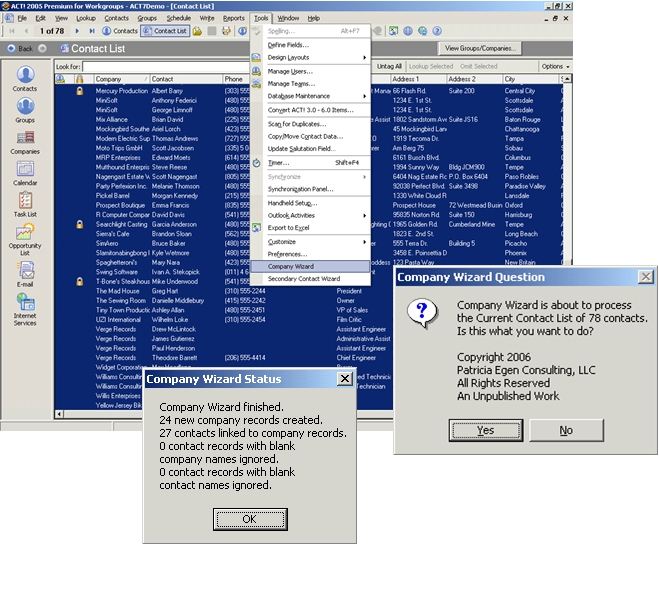
The Company Wizard is the answer. When in a contact list view, you locate the Company Wizard on the Tools menu. You select the contacts you wish to work with. This ACT addon wizard will do the following:
- Link a contact to an existing company record.
- Create a company record if it does not exist and then link the contact.
- Bypass contacts with blank company or contact records.
- Provide a menu box showing how many company records were created, how many contacts were linked and how many were skipped.
Click here for more details and our online manual.
System Requirements: For all versions of ACT! 2005 and higher
Price: $49.99 [wp_cart_button name="Comany Wizard" price="49.99" item_number="idPECCO1-10"]System Requirements - All versions of ACT 2005 and higher

$49.99
Advanced Delete User Wizard - $49.99
The purpose of this advanced tool is to allow the removal of users from an ACT database while retaining a historical reference to entries created by the user being deleted. For example, the way ACT works natively is as follows.
When you delete a user, a dialog box opens and asks you if you want to reassign the contacts. If you do not select this option, the contacts associated with the user being deleted are removed. If you reassign the contacts, the record manager is changed on all the entries EVER created by the user being deleted. For this reason, there is an option to make a user INACTIVE thereby freeing the license and retaining the histories and notes created by that user.
For databases with few user records, this is not an issue. However, in larger organizations or in organizations where staff changes frequently, the user table can grow quite large. That is why we created our tool. Our tool works as follows. It is selected from the Tools menu and is called Advanced Delete User. It will allow you to select the user you are deleting and the user to whom you are reassigning the records.
It will then go thru the database and add the text “Original Record Manager: <name>” (the name of the user being deleted is inserted after the colon) to the beginning of a Note entry and the beginning of the details portion of a History record. The record manager field/column will be changed to the new user. We do not have the ability to keep the original user name or “Record Manager” because of how Sage ACT refers to the underling User table. You will be able to find these history records later by doing a search for “original record manager:” or by searching for the original username.
You can choose to select to reassign the records to <none> in which case all the tool will do is update all the notes and histories with the original record manager name but not delete the user. This is convenient if you want to retain the original user for a period of time.
Click here for a more detailed description of this wizard and how it works inside ACT.
System Requirements: ACT! 2010 and higher
Price: $49.99 [wp_cart_button name="Advanced Delete User Wizard" price="49.99" item_number="idPECUD1-10"]System Requirements - ACT 2010 and higher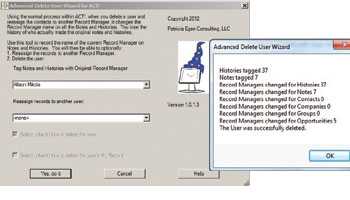
 $49.99
This version only works on versions of ACT 2010 and above. If you need this tool for versions 2005 thru 2009, contact our offices directly
Copy Fields Wizard - $29.99
Ever import an Excel spreadsheet into ACT! and notice that you have data in the wrong fields? For example, you put companies in the contact column and vice versa. Ever import or migrate data from another older version, or product, and find that a date field was entered using Text formatting and not date formatting?
Now you want to move the data to a true date field. That’s where this tool comes in handy. This ACT addon wizard will create a set of three additional menu items on the EDIT menu for Contacts, Companies and Opportunities.
These extra Copy/Replace/Swap menu items are an extension to the already great replacement tools provided by ACT! By Sage. You will see Copy Extended, Replace Extended, and Swap Extended. Using these dropdowns, you can copy, replace or swap ANY type field with ANY other type field. That includes text to date, date to text, etc.
If the fields you are swapping are different sizes, you will see an error alerting you to possible truncation of data. If you copy a text field that has date entries into a date field, the wizard will do it’s best effort at pulling over the text as dates.
It will use the underlying system date specifications that are enabled in your operating system.
System Requirements: ACT! version 2010 (v12) or higher
Price: $29.99 [wp_cart_button name="Copy Fields Wizard" price="29.99" item_number="idPECCF1-10"]System Requirements - All version of ACT 2010 and higher
 $29.99
This version only works on versions of ACT 2010 and above. If you need this tool for versions 2005 thru 2009, contact our offices directly
Fields and Tables to Excel Wizard - $19.99
This standalone ACT addon executable opens Excel, and creates a separate spreadsheet for every table (entity) within an ACT! database. Tables included are; Contact, Group, Company, Activity, Notes, Histories, opportunity and secondary contact. This extract is helpful if you are working on XML reports or with reporting tools such as Crystal. Each spreadsheet lists all the fields and the following columns:
|
|
Price: $19.99
Version for ACT 2010 to 2012 [wp_cart_button name="Fields and Tables to Excel Wizard" price="19.99" item_number="idPECFT1-10"]
Version for ACT 2013 and higher [wp_cart_button name="Fields and Tables to Excel Wizard - 2013" price="19.99" item_number="idPECFT31-10"]System Requirements - All versions of ACT 2005 thru 2013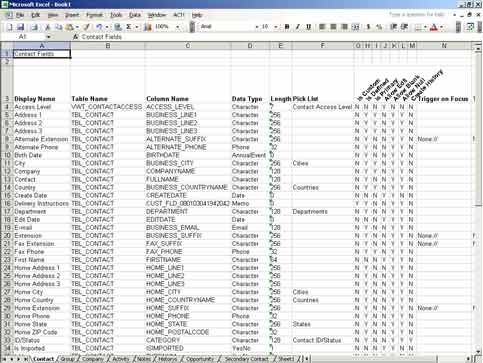
 $19.99
Act allows you to virtually unlimited Secondary Contacts to any contact allowing you to quickly locate alternate contacts, assistants, family members and other related contacts. Now that you have the ability to have comprehensive data for a secondary contact, you may want to take contacts that are primary and make them secondary to take advantage of the new capabilities or take the secondary contacts that were migrated from other CRM tools, and convert them into ACT secondary contacts.
This addon wizard will allow you do to the conversion. When you are in a contact list, the Secondary Contact wizard will show up on the Tools menu. You perform a lookup for contact(s) you want to demote along with the original Primary contact. You highlight (or select) the contact that will be the primary, and invoke the Secondary Contact item on the Tools menu. It will then do the following:
- Show a pop up a menu box that allows you to select whether or not you want to copy all the notes and histories from the contact that is being “demoted” to the primary contact.
- Give you an option to delete the secondary or keep it as a primary as well.
System Requirements: ACT! 2007 and higher
Price: $29.99 [wp_cart_button name="Primary to Secondary Wizard" price="29.99" item_number="idPECPS1-10"]System Requirements - All versions of ACT 2005 and above


$29.99
Copy ACT to Outlook Wizard - $29.99
Recent versions of ACT have a two way sync between Outlook and ACT. There is no mechanism for doing a one way copy. Occasionally, people only want to push contacts and calendars to Outlook and not have the Outlook data pushed back into ACT.
This little tool is a simple one way push/copy of ACT contacts and calendar data into Outlook. You have the option of sending all contacts or only those in a group. You can choose a broad date range for copying calendar data into Outlook. When copying data, you have two choices: Refresh/Copy and Delete.
The Refresh/Copy will copy over data. If the data already exists, it will delete what is in Outlook and REFRESH the information. Since this copy is destructive, ACT contacts and calendar data in Outlook should not be updated. If it is updated, it will be replaced when the next copy occurs. Contact fields that are copied into Outlook include the following: Contact name, address, city, state, zip, phones, email address.
Notes and histories are not copied. Calendar data includes meeting times and days. The meeting subject includes the name of the user. The details section includes any detail information plus the address, phone number and email of the contact associated with the activity. This enable smart dialing when using mobile phones.
Contacts created in Outlook are not touched. If the name exists in ACT and also in Outlook, a duplicate contact will be created. Calendar entries in Outlook are not touched. This tool is not meant to be a sync of data - meaning data refreshes to and from ACT and Outlook.
This is meant to be a simple push of data into Outlook so calendar entries can be viewed by other departments and contacts and calendar information can be pushed to mobile devices such as cell or smart phones.
System Requirements: ACT! 2009 and higher
Price: $29.99 [wp_cart_button name="ACT to Outlook Copy Wizard" price="29.99" item_number="idPECOC1-10"]System Requirements - ACT! 2009 thru 2013


$29.99
Patricia Egen Consulting - ACT Addon developers