Empty Cart

News & Blog

What We Say

Friday Did You Know - Google Chrome Shortcut Keys

I use Google Chrome as my browser and so do a lot of my customers.  There are some handy keyboard shortcuts I use all the time - and I thought I'd save the official list here for others as well. Tabs and windows Ctrl+N Open a new window Ctrl+Shift+N Open a new window in incognito mode Ctrl+T Open a new tab Ctrl+O Open a file in the browser Ctrl+Shift+Q (twice) Sign out of your Google Account on Chrome OS Ctrl+W Close the current tab Ctrl+Shift

Friday Did You know - Making Remote Desktop Full Screen

While practicing for my upcoming Virtual Roadshow, I noticed that when I went into Remote Desktop to access my virtual machine, it was not truly going full screen. Well, that was a bummer. I closed the remote desktop session and when I clicked on the Remote Desktop icon to restart it, I decided to click on the Options button to see if I could resolve this issue.  Sure enough, when I clicked on the DISPLAY tab, there was a slider bar that was not all the way to the right.  Once I

Friday Did you Know - Lookup ANY fields in ACT

We're starting a weekly "Friday Did you Know?" blog  that we hope you find helpful.  Sometimes a quick tip that we "assume" everyone knows is not so well known.  It's the classic don't assume action.  Here's this week's post. A really nice trick that has been part of the ACT CRM forever is the ability to search a special group of fields that start with ANY.  What this means is you don't have to remember where the phone number is shown - cell or home or business.  

ACT Premium for Web and Chrome v37

Having issues with some functions when using ACT Premium for the Web from Google Chrome? It's probably because your Chrome was updated to Version 37. In the process of removing some functions inside Chrome, they also disabled one used by ACT Premium for the web. Here's the workaround.

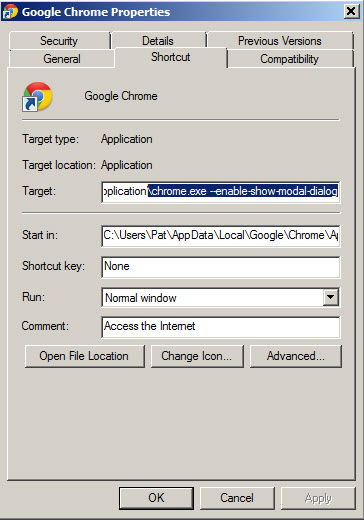
Right click on the icon you use to start Chrome.  You need to add the following paramert to the start line:  --enable-show-modal-dialog

The image below shows how this should look.

v37 Chrome fix for APFW

ACT v17 Virtual Roadshow

ACT! v17 is right around the corner.  We're holding a virtual roadshow to highlight the new features, fixes and enhancements as well as showcasing existing capabilities added in the last few releases.  This is not simply a "show you the new stuff" webinar.   This is a day in the life Acme Manufacturing.  We'll show you how to take your prospect from lead to customer, keep track of equipment, update purchases from your Quickbooks back into ACT and generate amazing quotes. This

Business Improvement - it's a process not a tool

Yet again, I met with a new client to discuss their current business "problem" or like I call them - "challenge."  The client called me looking for a silver bullet or tool.  By the end of the discussion, I believe I had them headed down the right path - that of better defining the process and problem and coming up with an appropriate solution that may or may not be based on a specific tool. This happens all the time.  That made me realize it would make a good blog article.  

Information Theft - when is it not cool to copy words

A client of mine called me last week concerned about some of his information showing up on a competitor's blog. When we looked at the article, it was very apparent that entire paragraphs had been copied and used in the blog. This indeed was plagerism and he called me for advice on his next steps. My client started blogging at my suggestion and I've been giving him advice on how to properly blog, including blogging etiquette. Playing nice, asking permission, and insuring that he also cited his

Act.Framework.MutableEntities.MutableEntity + FieldCollection + EmptyValueFieldException - Say What?

So you have a copy of our Duplicate Remover Wizard Expert for Act! and have set out to manage/reduce the duplicate contacts or companies in your Act! data base.  You run the program and it finds a good set of duplicates and you set the program to merging the records.  All indications are progress is being made.  Then, the next thing you see is this: The screen that then comes up appears to be filled with messages like this. Working on Fred Flintstone 8/31/2012

Patricia Egen Consulting, LLC

803 Creek Overlook, Chattanooga, TN 37415
Main office: 423-875-2652 • Arizona office: 480-788-7504 • Florida office: 754-300-2827
support@egenconsulting.com